TJ Homeschooling: Math

Showing posts with label Math. Show all posts

Adding 2 to a Number


Practice for the +2 facts!

Doubles (& Near Doubles) Addition Facts


Resources to practice the doubles & near doubles (doubles + 1 facts)

Sums to 5

Resources to help teach the sums to 5.


Adding 9 to a Number

Resources to help teach adding 9 to a number.
Adding 9 to a number

Adding 1 to a Number


Just a few quick resources that might be helpful if you are working on the +1s math facts:


Reflection Symmetry

A few resources to help introduce the concept of reflection symmetry (one half of an object is the reflection of the other half around a line of symmetry)

Learn


Intro to Symmetry Video
I thought this was a nice introduction to symmetry.


Math is Fun - Reflection Symmetry - a little lesson to help introduce the concept

Practice

Line of symmetry worksheets - set of 10 worksheets with a given line and student must determine if it is a line of symmetry.

Symmetry Math Center

This is a little math center I made for my kids years ago (updated slightly). The page that the sorting board is writing on can be folded and turned into a storage pouch. I highly recommend printing the board and cards out on cardstock for durability.


Acute, Obtuse, Right & Straight Angles

A few resources to help teach elementary students about the different types of angles .


Learn


Printables

Acute, Obtuse, Right,  Straight Angles Foldable - TJ Homeschooling


Activities

Games/Online Practice


Adding 4 to a Number

Resources to help students learn/memorize the +4 facts
A few quick resources to help practice the adding 4 to a number facts......

Worksheets/Drills

Adding 4 to Single Digit Numbers - Math-Drills.com

4s Addition Drills - 10 pages of drills - CommonCoreSheets.com

Online Practice 

Adding 4 to a Number (Online practice at IXL)


My Quizlet Study Set on Adding 4:
(Choose study mode in the bottom right corner for more activities)


A Strategy for Adding 4:

Add 2 to a number, then add 2 more. You can find a few activities to practice this strategy with Addition & Subtraction Facts Strategies (PDF, pages 74-77).

Number Sequencing: 0-10


We are working on sequencing numbers up to 10 and here are a few resources I have made and some online games for practice.

Worksheets/Activities


What Comes Before?


There are several options available here. Each pack comes with 2 different worksheets. Your child can trace the correct answer or write the correct answer in the blank space. In addition, I have provided a second set of the same worksheets, but the answers are in regular print (not dotted) so you can cut out the squares and make cards for your child to put a paper clip on the correct answer. 

I put the worksheets in page protectors so we could use them again and again, inshaa Allah.

Number Strip - just a little strip I made up to cut out so my daughter could use it if she needed to while completing activities such as the ones above.


Online Games

Caterpillar Ordering

ABC Ya Numerical Order Game

Balloon Pop Math - Pop the numbered balloons in order

Horizontal and Vertical Line Confusion

So while doing math, I told my daughter that when an addition or subtraction problem is presented to her, she should write or rewrite it "vertically" to solve it. Well, she was getting a little confused as to which was was vertical and horizontal so I made a little visual for her and if your student is having trouble with this as well, you can download the visual below!


Telling Time

Manipulatives

Interactive Demonstration Clock from Time-for-Time.com - this is helpful is you don't have a physical demonstration clock at home. Kids can play adjust minutes and hours on it.


This site has been around since my older kids were younger. Loads of resources. It has a demonstration clock, online games, and worksheets (though the worksheets aren't free anymore).


Posters/Charts


We were working on quarter to and quarter past in math and I wanted a reference poster for my daughter. I found some online but I made up this one to include some of the things that my daughter would often forget or has trouble with.


I made up a little poster and flashcards for my son a couple of years ago to review time concepts that I wanted him to memorize.  The poster is great to place in a student's reference binder/organizer. And it comes with a set of six flashcards.
Calendar/Clock Concepts Poster


Telling Time to the Hour

Telling Time to the Hour Poster (TJ Homechooling)
A simple poster showing the analog, digital and word form of time on the hour.


Telling Time to the Hour Cards - same printable as the Telling Time to the Hour Poster without the text below the clocks

Digital Clocks - can be used for various activities and games


Rounding Up/Down

Rounding to nearest 10


Rounding to nearest 10, 100, 1000.... (older students)


Printables

These are a few things I have made over the years for my kids to practice rounding

Rounding to Nearest 10 Helper
Rounding to Nearest 10 Game 
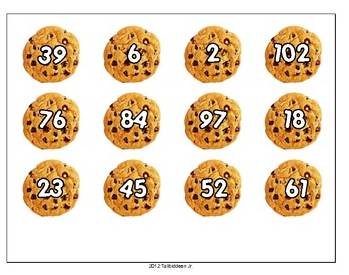
Use 1-100 number cards (not included) or just write a number on the board and student places a card or says what ten the number rounds to.

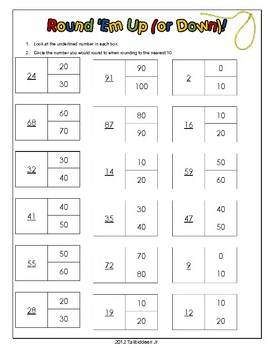
Nearest 10 Worksheet


Nearest 10 File Folder Game


Have fun rounding to the nearest 10 with this mini practice pack!

Includes:
-Rounding to nearest 10 helper (for students who have a hard time visualizing which two sets of 10 a number is inbetween)
-Two sorting activities to mix it up a little bit
-One rounding worksheet.


Math Resources Review: Smartick Method Online Math Supplemental Program

I recently had the opportunity to try "Smartick Method," an online subscription based supplemental learning program for math. that helps "foster the development of math skills using interactive tools." We received a free 3 month subscription in exchange for sharing our experience with the program.

A little about the program
As I mentioned, Smartick Method is a supplemental math program.  The recommended age range of the program is for children ages 4-14. It provides students with short sessions (of about 15 minutes) and it is stressed that for maximum results, students should use the program daily. It is an adaptive program so it adjusts to your child's skill level and builds upon that. Students are given an avatar that they can customize. There is a virtual world for them to explore and by accumulating credits, they can buy and customize their virtual world.

Our Experience
We started the program in December, while we were on a break (my public school ids were on winter vacation so I decided to schedule our homeschool for a break).

Getting started
Once you set up your accounts, your child creates and customizes an avatar.

Each day, when your child starts a session, the program greets them:


Next, the program asks you how you are feeling:


My 8 year old daughter said she enjoyed these two features.


This is what a typical study session screen will look like. There is a progress bar off to the left that fills up as students progress. This earns them "ticks" (stars). Kids can later redeem the stars for things in their virtual world.


Another type of exercise my daughter has gotten:


After your child completes his/her session a few things happen:


1) Your student is asked how they felt about the session:


2) the program asks if they want to go back and make corrections. An incentive is given if he/she goes back and makes corrections.


My kids don't generally don't feel compelled to go back and make corrections, even with the incentives.

3) Next, they are given the results of the session:

To encourage daily use of the program, ticks are awarded for the number of consecutive days completed.

At this point, your student can stop, or explore the virtual world. In the virtual world there are different options:

Buy things for your room with your accumulated ticks:


Compete against other users in games:


Or play games on their own:


The games are arranged by type: attention, memory, perception, and reasoning:


My daughter really enjoys the mini games. She says they "challenge her mind."

There is also an area where they can make and add friends. They can make a suggestion as to how the program can be improved:

My daughter made a suggestion on her own that kids be awarded ticks for the mini games.

She really enjoys the program and looks forward to using it. I have to remind her to do it, but when I do, she is usually quick to get to it. My 11 year old son, well, he is not so interested in the program and it is more of a chore for him.  Sometimes he complains about the sessions being so long, but I think it is more from just a disinterest since it is educational related.  When he earns his ticks, he usually lets his baby sister buy things in the virtual world to decorate his virtual room.

Parent Involvement
One thing I like about the program (which I found annoying at first as I wasn't really paying attention) is the amount that it involves the parent.

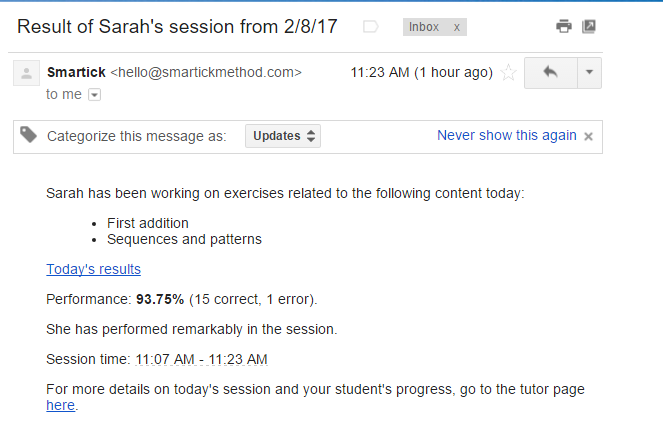
As soon as a session is completed, it will send you an email of the results:


It contains a "here" link where you can see details of the session, which is very helpful when they don't do so well.

If your student hasn't completed a session that day, you get a reminder email. After the first reminder email, if your student has still not completed a session, you will get a second email:


At first this was annoying, but it really was helpful because sometimes I just forget to have them work on it. (They always need a reminder). I looked in the settings, but not sure if you can change this notification. But it is helpful.

Parents have their own separate login and they can view their kids progress from their parent's dashboard:


Our assessment
Overall, I think it is a good program. I think with consistent, daily practice it can be very helpful.  It is kind of a struggle for me to get my kids to do it everyday, moreso lack of discipline on my part. My daughter gives the program a thumbs up. My son is not so interested in it (and really any supplemental math program that we've tried). I think that the virtual world may be too young for him as he wasn't really motivated to earn ticks to buy things in the virtual world.

Some things my daughter said she liked:

  • competitions against other users (however, I think it randomly assigns users to compete with and they may or may not be online I guess because it says that it could take days for the user to respond, so it's not like a real time competition, well, at least not the one I watched my daughter do).
  • the pets
  • that the program greets you with "good morning, (afternoon, etc) and that it asks you how you are feeling and how the session was
What she didn't like:
  • Some of the activities were hard and she couldn't figure them out on her own. When she got something wrong, only the solution was given, but it didn't give an explanation (not sure if it was just that type of problem, or if this is in general just to give the solution).
A nice feature is that if your student is not a fluent reader, they can click on a megaphone and hear the exercises read.  You can also assign another tutor (dad, a sibling, etc) to help out with managing the program.

This program is an international program, not just specific for US students, so some of the wording may be a bit unfamiliar in the problems and the awards are referred to as "ticks" instead of stars. 

I'm not sure if we will continue on after our trial, not that I don't like it, but moreso just because I am frequently really bad at follow through and I wouldn't want pay for it and we don't get a great deal of use for it.

I recommend checking it out if you have a student who is struggling with math and see if it will work for you. You can check it out at  www.Smartick.com (I receive a discount if you purchase a subscription through this link and YOU receive a 25% discount).


Happy Math-ing!


Triangles

Classification of Triangles

By Angle/By Sides

Triangles can be classified by sides:
  • scalene triangles have no equal sides
  • isosceles triangles have 2 equal sides
  • equilateral triangles have 3 equal sides
Triangles can be classified by their angles:
  • acute triangles  have 3 acute angles
  • obtuse triangles have 1 obtuse angle
  • right triangles have 1 right angle
Types of Angles Graphic Organizer


Types of Triangles - Notebooking pages - cut and paste notes, review flashcards.


Right Triangles/Pythagorean Theorem

Pythagorean Theorem Cut and paste notes - includes square root review and study questions. 3 pages.


Congruency

Congruent Triangles Notebooking Notes - includes corresponding angles, sides and SAS and SSS, ASA. Includes review flashcards. 4 pages.